

Multi Attach EBS
As we know that the EBS Volume can’t be attached to instance that are in different AZ. But, the EBS volume can be attached to multiple instance in the same AZ. If you read in this documentation, EBS only can be muliti attach only for volume type io1 and io2, it can’t be done using another volume type.
Architecture Overview
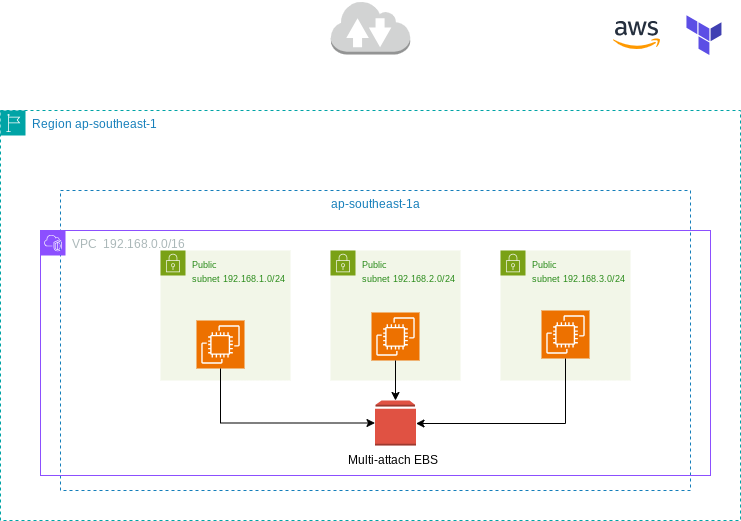
The following architecture is used to attach EBS Volume to multiple instance.
Prerequisites
- VPC, Three subnet (In here i will use public subnet), 1 IGW, 1 RTB
- 1 Security Group (Allow SSH, HTTP, HTTPS)
- Three EC2 Instance in the same AZ (You can provision only two also)
- 1 EBS Volume io2
Terraform Implementation
VPC, Subnet IGW, and RTB
# ====================================================================================================
# Configuring Multi-Attach EBS Volumes with Terraform
# ====================================================================================================

provider "aws" {
  region  = "ap-southeast-1"
  profile = "default"

  default_tags {
    tags = {
      Owner   = "nugroho-L1"
      Project = "Testing"
    }
  }
}


# ====================================================================================================
# VPC and Network Infra
# ====================================================================================================

resource "aws_vpc" "main" {
  cidr_block           = "192.168.0.0/16"
  instance_tenancy     = "default"
  enable_dns_hostnames = true

  tags = {
    Name = "nugroho-vpc"
  }
}

# Subnets
resource "aws_subnet" "a" {
  vpc_id            = aws_vpc.main.id
  cidr_block        = "192.168.1.0/24"
  availability_zone = "ap-southeast-1a"

  tags = {
    Name = "Public-Subnet-A-nugroho"
  }
}

resource "aws_subnet" "b" {
  vpc_id            = aws_vpc.main.id
  cidr_block        = "192.168.2.0/24"
  availability_zone = "ap-southeast-1a"

  tags = {
    Name = "Public-Subnet-B-nugroho"
  }
}

resource "aws_subnet" "c" {
  vpc_id            = aws_vpc.main.id
  cidr_block        = "192.168.3.0/24"
  availability_zone = "ap-southeast-1a"

  tags = {
    Name = "Public-Subnet-C-nugroho"
  }
}

# Internet Gateway
resource "aws_internet_gateway" "gw" {
  vpc_id = aws_vpc.main.id

  tags = {
    Name = "main-igw-nugroho"
  }
}

# Route Table
resource "aws_route_table" "main" {
  vpc_id = aws_vpc.main.id

  route {
    cidr_block = "0.0.0.0/0" # Route to all external IPs
    gateway_id = aws_internet_gateway.gw.id
  }

  tags = {
    Name = "main-route-table-nugroho"
  }
}

# Route Table Associations
resource "aws_route_table_association" "a" {
  subnet_id      = aws_subnet.a.id
  route_table_id = aws_route_table.main.id
}

resource "aws_route_table_association" "b" {
  subnet_id      = aws_subnet.b.id
  route_table_id = aws_route_table.main.id
}

resource "aws_route_table_association" "c" {
  subnet_id      = aws_subnet.c.id
  route_table_id = aws_route_table.main.id
}
Security Group
# ====================================================================================================
# Security Groups
# ====================================================================================================
# Security Group for EC2
resource "aws_security_group" "ec2-sec-group" {
  name        = "allow_from-ssh"
  description = "Allow ssh and http and https from anywhere"
  vpc_id      = aws_vpc.main.id

  tags = {
    Name = "ec2-sec-group-nugroho"
  }
}


# Allow inbound SSH traffic (port 22) from anywhere
resource "aws_security_group_rule" "allow_ssh" {
  type              = "ingress"
  from_port         = 22
  to_port           = 22
  protocol          = "tcp"
  security_group_id = aws_security_group.ec2-sec-group.id
  cidr_blocks       = ["0.0.0.0/0"]
}

# Allow inbound HTTP traffic (port 80) from anywhere
resource "aws_security_group_rule" "allow_http" {
  type              = "ingress"
  from_port         = 80
  to_port           = 80
  protocol          = "tcp"
  security_group_id = aws_security_group.ec2-sec-group.id
  cidr_blocks       = ["0.0.0.0/0"]
}

# Allow inbound HTTPS traffic (port 443) from anywhere
resource "aws_security_group_rule" "allow_https" {
  type              = "ingress"
  from_port         = 443
  to_port           = 443
  protocol          = "tcp"
  security_group_id = aws_security_group.ec2-sec-group.id
  cidr_blocks       = ["0.0.0.0/0"]
}


# Allow all outbound traffic
resource "aws_security_group_rule" "allow_all_outbound_ec2" {
  type              = "egress"
  from_port         = 0
  to_port           = 0
  protocol          = "-1"
  security_group_id = aws_security_group.ec2-sec-group.id
  cidr_blocks       = ["0.0.0.0/0"]
}
EC2 Instance
# ====================================================================================================
# Launch an EC2 Instance
# ====================================================================================================

# Get latest Ubuntu AMI
data "aws_ami" "ubuntu" {
  most_recent = true
  owners      = ["099720109477"] # The official Ubuntu AMI owner ID, if the owner using amazon, then it can't connect.

  filter {
    name   = "name"
    values = ["ubuntu/images/hvm-ssd/ubuntu-*-amd64-server-*"]
  }
}


# Define a map of subnets and availability zones dynamically using locals
locals {
  subnets = {
    a = aws_subnet.a.id
    b = aws_subnet.b.id
    c = aws_subnet.c.id
  }
}

# Create the Ubuntu EC2 Web server
resource "aws_instance" "web" {
  for_each                    = local.subnets
  ami                         = data.aws_ami.ubuntu.id
  instance_type               = "t3.micro"
  key_name                    = "nugroho-msikp"
  subnet_id                   = each.value
  associate_public_ip_address = true
  vpc_security_group_ids      = [aws_security_group.ec2-sec-group.id]

  tags = {
    Name = "web-server-apache-${each.key}-nugroho"
  }

  user_data = <<-EOF
  #!/bin/bash
  sudo apt-get update -y
  sudo apt-get install apache2 -y
  sudo systemctl start apache2
  sudo systemctl enable apache2
  instanceId=$(curl http://169.254.169.254/latest/meta-data/instance-id)
  instanceAZ=$(curl http://169.254.169.254/latest/meta-data/placement/availability-zone)
  pubHostName=$(curl http://169.254.169.254/latest/meta-data/public-hostname)
  pubIPv4=$(curl http://169.254.169.254/latest/meta-data/public-ipv4)
  privHostName=$(curl http://169.254.169.254/latest/meta-data/local-hostname)
  privIPv4=$(curl http://169.254.169.254/latest/meta-data/local-ipv4)

  echo "<font face = 'Verdana' size = '5'>"                               > /var/www/html/index.html
  echo "<center><h1>AWS Ubuntu VM Deployed with Terraform</h1></center>"   >> /var/www/html/index.html
  echo "<center> <b>EC2 Instance Metadata</b> </center>"                  >> /var/www/html/index.html
  echo "<center> <b>Instance ID:</b> $instanceId </center>"                      >> /var/www/html/index.html
  echo "<center> <b>AWS Availability Zone:</b> $instanceAZ </center>"             >> /var/www/html/index.html
  echo "<center> <b>Public Hostname:</b> $pubHostName </center>"                 >> /var/www/html/index.html
  echo "<center> <b>Public IPv4:</b> $pubIPv4 </center>"                         >> /var/www/html/index.html
  echo "<center> <b>Private Hostname:</b> $privHostName </center>"               >> /var/www/html/index.html
  echo "<center> <b>Private IPv4:</b> $privIPv4 </center>"                       >> /var/www/html/index.html
  echo "</font>"                                                          >> /var/www/html/index.html
  EOF
}
EBS Volume and Attachment
# ====================================================================================================
# EBS Multi Attach Volume and Attach to all EC2 Instances
# ====================================================================================================

resource "aws_ebs_volume" "volume" {
  availability_zone    = "ap-southeast-1a"
  size                 = 4
  type                 = "io2"
  iops                 = 200
  multi_attach_enabled = true
}

resource "aws_volume_attachment" "ebs_attach" {
  for_each    = aws_instance.web
  device_name = "/dev/sdh"
  volume_id   = aws_ebs_volume.volume.id
  instance_id = each.value.id
}
Outputs
# ====================================================================================================
# Outputs
# ====================================================================================================

# Output public IPs of all EC2 instances
output "instance_public_ips" {
  value = {
    for key, instance in aws_instance.web : key => instance.public_ip
  }
  description = "Public IPs of the EC2 instances"
}

# Output private IPs of all EC2 instances
output "instance_private_ips" {
  value = {
    for key, instance in aws_instance.web : key => instance.private_ip
  }
  description = "Private IPs of the EC2 instances"
}
Access the VM/EC2
I’ve already outputs the instance public IP in the terraform script, if you access the instance in the browser, and try refresh the browser several times, you’ll see that the instance we access is differents.
Common Errors and Troubleshooting
Can’t access the browser
If you can’t access the instance in the browser, please check the security group that you use, make sure that the security group allow inbound HTTP/HTTPS from anywhere.
AttachmentLimitExceeded error
Btw there are number of limit when attaching ebs volume to the instance, it depends on the instance type.
References:
- https://docs.aws.amazon.com/AWSEC2/latest/UserGuide/volume_limits.html