
Move Data From S3 to S3 Using Datasync
AWS DataSync is a managed data transfer service that makes it easy to move data between on-premises storage and AWS storage services, as well as between AWS storage services themselves. In this guide, i’ll walk through the steps to move data from one S3 bucket to another S3 bucket using AWS DataSync.
What is AWS Datasync?
AWS DataSync is a fully managed data transfer service that simplifies moving large amounts of data between on-premises storage and AWS services, or between AWS storage services such as Amazon S3, EFS, and FSx. In this guide, i’ll walk through the steps to move data from one S3 bucket to another S3 bucket using AWS DataSync.
Architecture Overview
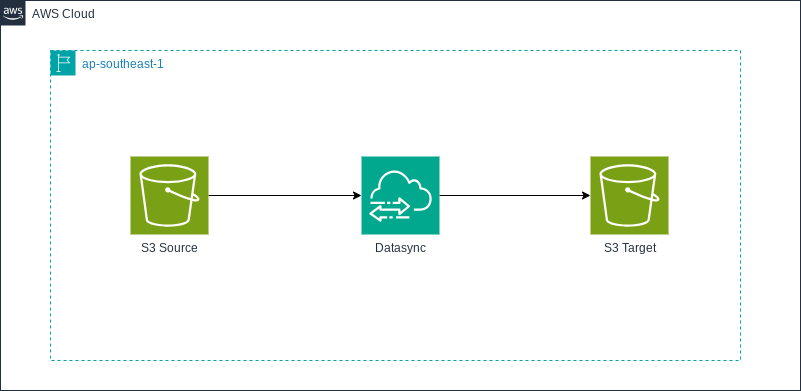
The following architecture is used to transfer data between two S3 buckets using AWS DataSync.
Prerequisites
Before starting, make sure you have:
- Two S3 buckets (source and destination)
- IAM permissions to create DataSync resources
- Terraform installed (v1.x or later)
- AWS CLI configured
Terraform Implementation
Two S3 Bucket (Source & Destination)
# provider configuration
provider "aws" {
  region  = "ap-southeast-1"
  profile = "default"
  default_tags {
    tags = {
      Owner   = "Nugroho-L1"
      Project = "Testing"
    }
  }
}

# create source and destination s3 bucket
resource "aws_s3_bucket" "s3_source" {
  bucket        = "nugrohosource-testing-bucket"
  force_destroy = true
}

resource "aws_s3_bucket" "s3_destination" {
  bucket        = "nugrohodestination-testing-bucket"
  force_destroy = true
}

# disable ACLs for s3 destination account
resource "aws_s3_bucket_ownership_controls" "s3_destination_disable_acls" {
  bucket = aws_s3_bucket.s3_destination.id
  rule {
    object_ownership = "BucketOwnerPreferred"
  }
}
IAM Policy for S3 Bucket
# create iam role for datasync (This Policy is created for the source bucket)
resource "aws_iam_role" "datasync_role" {
  name = "source-datasync-role" # the name of the role should be harcoded

  assume_role_policy = jsonencode({
    Version = "2012-10-17"
    Statement = [
      {
        Action = "sts:AssumeRole"
        Effect = "Allow"
        Principal = {
          Service = "datasync.amazonaws.com"
        }
      }
    ]
  })
}

# inline policy for the iam role
resource "aws_iam_role_policy" "datasync_policy" {
  name = "DataSyncS3Policy"
  role = aws_iam_role.datasync_role.id

  policy = jsonencode({
    Version = "2012-10-17"
    Statement = [
      # Permissions for the source bucket
      {
        Action = [
          "s3:GetBucketLocation",
          "s3:ListBucket",
          "s3:ListBucketMultipartUploads"
        ]
        Effect   = "Allow"
        Resource = aws_s3_bucket.s3_source.arn
      },
      {
        Action = [
          "s3:AbortMultipartUpload",
          "s3:DeleteObject",
          "s3:GetObject",
          "s3:ListBucket",
          "s3:ListMultipartUploadParts",
          "s3:PutObject",
          "s3:GetObjectTagging",
          "s3:PutObjectTagging"
        ]
        Effect   = "Allow"
        Resource = "${aws_s3_bucket.s3_source.arn}/*"
      },
      # Permissions for the destination bucket
      {
        Action = [
          "s3:GetBucketLocation",
          "s3:ListBucket",
          "s3:ListBucketMultipartUploads"
        ]
        Effect   = "Allow"
        Resource = aws_s3_bucket.s3_destination.arn
      },
      {
        Action = [
          "s3:AbortMultipartUpload",
          "s3:DeleteObject",
          "s3:GetObject",
          "s3:ListBucket",
          "s3:ListMultipartUploadParts",
          "s3:PutObject",
          "s3:GetObjectTagging",
          "s3:PutObjectTagging"
        ]
        Effect   = "Allow"
        Resource = "${aws_s3_bucket.s3_destination.arn}/*"
      }
    ]
  })
}


# update the source s3 bucket policy
resource "aws_s3_bucket_policy" "source_bucket_policy" {
  bucket = aws_s3_bucket.s3_source.id

  policy = jsonencode({
    Version = "2008-10-17"
    Statement = [
      {
        Sid    = "DataSyncCreateS3LocationAndTaskAccess"
        Effect = "Allow"
        Principal = {
          "AWS" : "${aws_iam_role.datasync_role.arn}"
        }
        Action = [
          "s3:GetBucketLocation",
          "s3:ListBucket",
          "s3:ListBucketMultipartUploads",
          "s3:AbortMultipartUpload",
          "s3:DeleteObject",
          "s3:GetObject",
          "s3:ListMultipartUploadParts",
          "s3:PutObject",
          "s3:GetObjectTagging",
          "s3:PutObjectTagging"
        ]
        Resource = [
          aws_s3_bucket.s3_source.arn,
          "${aws_s3_bucket.s3_source.arn}/*"
        ]
      }
    ]
  })
}

# update the destination s3 bucket policy
resource "aws_s3_bucket_policy" "destination_bucket_policy" {
  bucket = aws_s3_bucket.s3_destination.id

  policy = jsonencode({
    Version = "2008-10-17"
    Statement = [
      {
        Sid    = "DataSyncCreateS3LocationAndTaskAccess"
        Effect = "Allow"
        Principal = {
          "AWS" : "${aws_iam_role.datasync_role.arn}"
        }
        Action = [
          "s3:GetBucketLocation",
          "s3:ListBucket",
          "s3:ListBucketMultipartUploads",
          "s3:AbortMultipartUpload",
          "s3:DeleteObject",
          "s3:GetObject",
          "s3:ListMultipartUploadParts",
          "s3:PutObject",
          "s3:GetObjectTagging",
          "s3:PutObjectTagging"
        ]
        Resource = [
          aws_s3_bucket.s3_destination.arn,
          "${aws_s3_bucket.s3_destination.arn}/*"
        ]
      }
    ]
  })
}
Datasync Task and Location
# create datasync source and destination location
# Create DataSync source location
resource "aws_datasync_location_s3" "source" {
  s3_bucket_arn = aws_s3_bucket.s3_source.arn
  subdirectory  = "/"
  s3_config {
    bucket_access_role_arn = aws_iam_role.datasync_role.arn
  }
}

resource "aws_datasync_location_s3" "destination" {
  s3_bucket_arn = aws_s3_bucket.s3_destination.arn
  subdirectory  = "/"
  s3_config {
    bucket_access_role_arn = aws_iam_role.datasync_role.arn
  }
}

# create datasync task
resource "aws_datasync_task" "s3_same_region" {
  name                     = "s3_same_region"
  destination_location_arn = aws_datasync_location_s3.destination.arn
  source_location_arn      = aws_datasync_location_s3.source.arn

}
Running the Data Transfer
After applying the Terraform configuration, the DataSync task can be triggered manually from the AWS Console or via AWS CLI. For this demo, i will upload the CSV file to the S3 source bucket using CLI. You can refer to this documentation about how to set up AWS CLI.
# Upload a sample CSV file to the source S3 bucket
aws s3 cp currency.csv s3://nugrohosource-testing-bucket/ --profile default
Once the file is uploaded, start the DataSync task either from the AWS Console or by using the AWS CLI. And after task execution sucessfully, you’ll see the CSV file is in the destination bucket.
# Verify the file in the destination S3 bucket
aws s3 ls s3://nugrohosource-testing-bucket/ --profile default
Monitoring and Logging
AWS DataSync integrates with Amazon CloudWatch to provide:
- Task execution status
- Bytes transferred
- Error logs
Common Errors and Troubleshooting
Access denied. Ensure bucket access role has s3:ListBucket permission.
Errors:
- Access denied. Ensure bucket access role has s3:ListBucket permission.
Solution:
- Ensure the IAM Role has “Action”: “sts:AssumeRole”
References:
- https://repost.aws/questions/QUPD3ZX7p3T3OQkk19QN-iEw/datasync-between-s3-buckets-failing-ensure-bucket-access-role-has-s3-listbucket-permission
Cross-Account S3 to S3
If you want to transfer data between s3 in the different account, you can refer to this documentation:
References:
- https://docs.aws.amazon.com/datasync/latest/userguide/tutorial_s3-s3-cross-account-transfer.html
- https://medium.com/@nayanarora55/cross-account-s3-migration-aws-datasync-does-it-so-you-dont-have-to-9b85a23d1464